
Abstract. Agent-based modeling tools commonly trade off usability against power and vice versa. On the one hand, full development environments like NetLogo feature a shallow learning curve, but have a relatively limited proprietary language. Others written in Python or Matlab, for example, have the advantage of a full-featured language with a robust community of third-party libraries, but are typically more skeletal and require more setup and boilerplate in order to write a model. Helipad is introduced to fill this gap. Helipad is a new agent-based modeling framework for Python with the goal of a shallow learning curve, extensive flexibility, minimal boilerplate, and powerful yet easy to set up visualization, in a full Python environment. We summarize Helipad’s general architecture and capabilities, and briefly preview a variety of models from a variety of disciplines, including multilevel models, matching models, network models, spatial models, and others.
Journal of Open Research Software, Forthcoming.
Agent-based modeling is an alternative to traditional analytical modeling that simulates interactions among agents algorithmically (see Bonabeau 2002; Epstein & Axtell 1996 for overviews). It is particularly valuable for modeling dynamic systems that are difficult to describe with a closed-form analytical solution. In an agent-based model, discrete agents are programmed to interact under conditions that simulate the environment in question, and carry their state with them. Agent behavior can be directly specified in an open-ended way, allowing models to be interpreted much more easily than highly stylized analytical models where agent state can be specified only at an aggregate level. In addition, equilibrium can emerge from such a model – or not – without building the equilibrium into the assumptions of the model (Arthur 2015, ch. 1).
Agent-based modeling necessarily involves programming, and there are numerous frameworks available in a variety of languages. NetLogo is one popular integrated development environment (IDE) that includes a code editor, a proprietary language, and extensive visualization tools, especially for spatial models (Banos et al. 2015; Wilensky & Rand 2015; Railsback and Grimm 2012). Its popularity is due to its shallow learning curve and its integrated environment: very little setup is necessary, models can be easily packaged, and visualizations are simple to set up.
Nevertheless, NetLogo is limited in important ways. First, its language is only object-oriented in a very restricted sense, limiting some of the advantages of agent-based models that involve the states of individual agents.1 And second, while its self-containedness is an advantage in some respects, it also limits the ability to interact with outside libraries and to use code written for more traditional object-oriented languages.
Agent-based modeling frameworks in other languages on the other hand – for example, in Python (Kazil, Masad, & Crooks 2020), Java (Luke et al., 2018), MatLab, or Mathematica – have the potential to be far more powerful with the ability to draw on general language features, outside libraries, and wider communities of users. However, they are not integrated IDEs: they tend to be skeletal, to provide a basic structure with some visualization capabilities, but generally require a great deal more setup and boilerplate – especially for visualization – than an IDE like NetLogo.
This paper introduces a new agent-based modeling framework for Python, Helipad, to fill this gap. Helipad is a framework rather than an IDE (although the distinction is blurrier when used in a Jupyter notebook), but it has the goal of reducing boilerplate to a minimum and allowing models to be built, tested, and visualized in incremental steps, an important trait for rapid debugging (Gilbert and Troitzch 2005, 21). In the following section we introduce Helipad’s general architecture and its array of modeling capabilities.2 Section 2 provides an overview of various sample models that have been written to demonstrate Helipad’s capabilities. The paper concludes with suggestions for future applications.
Helipad runs cross-platform on Python 3.9 or higher. It has minimal dependencies, requiring only Matplotlib (Hunter 2007) and NetworkX (Hagberg et al 2008) for visualizations, and Pandas (McKinney 2010) for data collection, both of which in turn rely on Numpy (Harris et al. 2020). Shapely is optional at install time, but required for geospatial models.
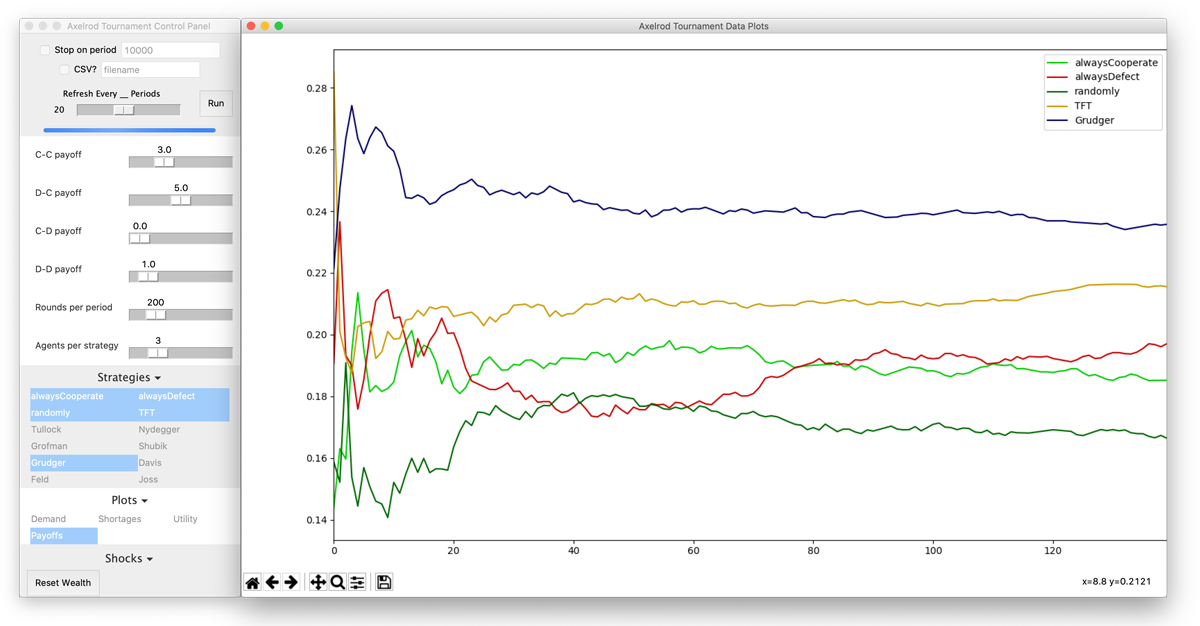
Helipad can be run “headlessly” or with a GUI, which consists of a control panel and/or a visualization window. The GUI can be run in two different environments. First, a Helipad model can be run directly as a .py file, using Tkinter to provide a cross-platform windowed application interface (Fig. 1).
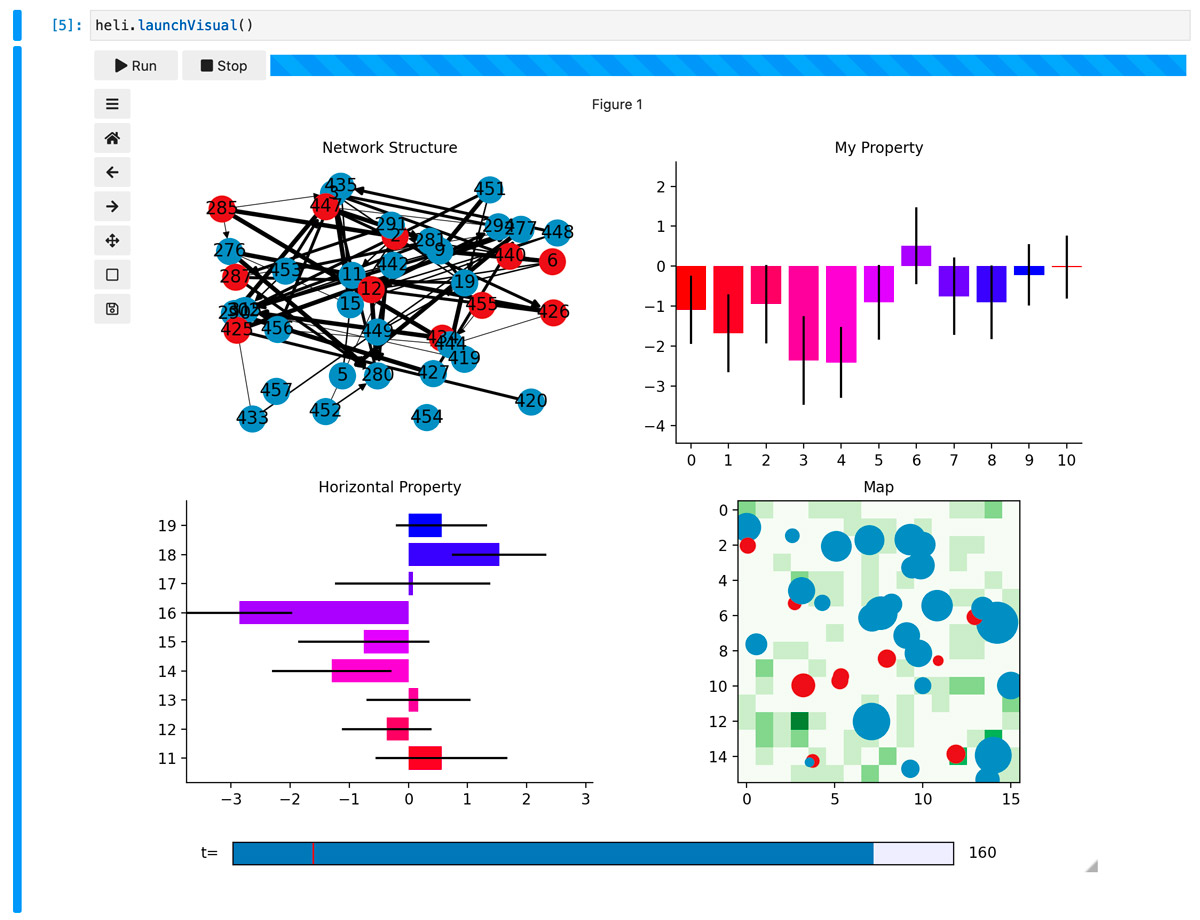
Helipad can also be run in a Jupyter notebook (Fig. 3), a format that allows code and exposition to be mixed together and run in-browser (Kluyver et al. 2016) in an environment very nearly approaching an IDE. Model code and features are identical in both frontends. Doing so requires, in addition to Jupyter Lab, the Ipywidgets and Ipympl libraries.
Helipad is available on PyPi.org, and is most easily installed using pip install helipad from the command line. It can also be installed with Conda using conda install -c charwick helipad.
There are two distinct strategies that can govern the relationship between user code and the code of an agent-based modeling framework (Fig. 2). The two are not entirely mutually exclusive, but in practice, frameworks will hew toward one or the other.
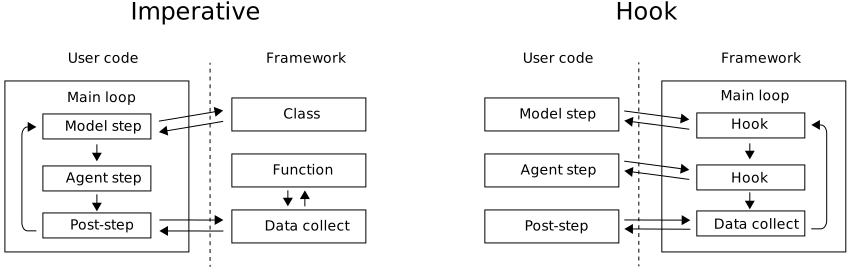
Helipad uses a hook strategy, and minimizes the disadvantages by providing direct access to the model class in most hooks, allowing as much fine-grained control over the model’s runtime as would be possible with an imperative framework.
Helipad provides a loop structure for a model, into the elements of which user code can be inserted via hooks. Some of these will be critical to a model’s functioning (e.g. the agents’ step function); others offer low-level control over various aspects of the model (e.g. the cpanel hooks).
The @heli.hook decorator inserts a user function into these specified points in the model’s runtime. For example, the following agent step function instructs agents to work in the first stage of each period, and consume their product in the second stage.
from helipad import *
heli = Helipad()

@heli.hook
def agentStep(agent, model, stage):
    if stage==1: agent.wealth += produce(agent.id, agent.laborSupply)
    elif stage==2:
        agent.utility += sqrt(agent.wealth)
        agent.wealth = 0
        agent.laborSupply = random.normal(100, 10)
To tell Helipad to run this code for every agent every stage of every period, the @heli.hook decorator is added to the top of the function, which is named so that Helipad runs it during the agentStep hook. The decorator can also take the hook name as an argument (e.g. @heli.hook('agentStep')) and be placed above a function with any name.
There are a few things to notice about this example.
agentStep hook: agent, model, and stage. The documentation specifies the exact function signature to be used for each hook.agent and model objects are passed as arguments, allowing access to their properties and methods during each agent step.prioritize argument can be used to move a hook to the front of the queue).Helipad provides for agent heterogeneity through agent breeds. A breed is registered during model setup, and assigned to an agent when it is initialized, whether at the beginning of the model run or through reproduction. An agent’s breed can be accessed with the agent.breed property.
Goods are items that agents can hold stocks of, which are kept track of in the agent.stocks property. Goods are also registered during model setup, along with user-defined per-agent properties (for example, agents might have a reservation price for each good), and can be exchanged using agent.trade(). One good may optionally be used as a medium of exchange, which allows the agent.buy() and agent.pay() functions to be used. Agents can optionally take a variety of utility functions over these goods, including Cobb Douglass, Leonteif, and CES.
Agent primitives are a way to specify deeper heterogeneity than breeds. Primitives are registered using a separate agent class, subclassed from baseAgent, and their behavior is specified using separate hooks. For example, a model might use primitives to distinguish between permanently distinct ‘buyer’ and ‘seller’ agents that share no common code, while using breeds within each agent to distinguish separate buying and selling strategies. An agent cannot switch primitives once instantiated. Agents of a given primitive can be accessed using model.agents[primitive], and by breed within that primitive with model.agents[primitive][breed]. The default primitive is ‘agent’, which is registered automatically at the initialization of a model. Agents of all primitives can be hooked with the baseAgent set of hooks.
One included primitive is the MultiLevel class, allowing for multi-level agent-based models where the agents at one level are themselves full models (Mathieu et al. 2018). MultiLevel therefore inherits from both the baseAgent and the Helipad classes.
Helipad’s agent class is well-suited to evolutionary models and genetic algorithms (Holland 1992; 1998). Agents can reproduce both haploid and polyploid through a powerful agent.reproduce() method that allows child traits to be inherited in a variety of ways from one or multiple parents, along with mutations to those traits. Ancestry is tracked with a directed network (see below on networks). Agents keep track of their age in periods in the agent.age property, and can be killed with agent.die().
Helipad constructs its control panel GUI primarily with user parameters that allow model variables to be adjusted before and, optionally, during model runtime. Parameters can be registered with model.params.add(). Helipad supports the following parameter types, depending on the format of the variable in question:
False otherwise. The text box can be numeric or a string.Figure 1 above shows six slider parameters and two checkgrids, along with two checkentries and a slider in the top configuration section.
Helipad also allows parameters to be specified on a per-breed and per-good basis, with the parameter taking separate values for each registered breed or good. Current parameter values can be accessed at any point in model code using model.param(). Parameters can also be set in model code, in which case they are also reflected in the control panel GUI.
Helipad provides a shocks API for numeric parameters. A shock consists of a parameter, a timer function that takes the current model time and outputs a boolean, and a value function that takes the current parameter value and outputs a new value. The value function will then update the parameter value whenever the timer function returns True. This can be used for one-time, regular, or stochastic shocks, possibly generating data for impulse response functions as in Harwick (2018). Registered shocks can be toggled on and off before and during the model’s runtime in the control panel.
Spatial models are the bread and butter of many agent-based models (Banos et al. 2015; Railsback et al. 2012; Wilensky 2015), especially in epidemiology where they are commonly used to model infection spread (e.g. Hunter et al. 2017; Arfin et al. 2016). Helipad can optionally instantiate a spatial map on which agents can move using model.spatial(). Spatial models are created by initializing a Patch primitive and creating an undirected grid network connecting neighboring patches, with optional diagonal connections.
Spatial models can be initialized with a number of geometries:
Agents in spatial models acquire position and orientation properties, along with methods for motion appropriate to the coordinate system (i.e. agent.up(), .down(), .left(), and .right() in rectangular geometries, and agent.clockwise(), .counterclockwise(), .inward(), and .outward() in polar geometries). Agents can also move absolutely and relatively, as well as .forward() in their oriented direction. Orientations can be set and accessed in either degrees or radians by setting the baseAgent.angleUnit static property.
Patches are a fixed primitive, meaning they cannot reproduce or move. They can die, however, but unlike other killed agents, can be revived later. Agents on a patch that dies will either die themselves or return None for their patch property, depending on whether agents have been allowed offmap in the initializing spatial() function.
Ease of visualization is the key advantage of Helipad over other Python-based agent-based modeling frameworks. Unlike some others which have the user create plots directly in (e.g.) Matplotlib, or require the launch of a webserver, Helipad includes an extensible visualization API to manage a full-featured and interactive visualization window. It can also be easily extended with custom visualizations written in Python, without a frontend/backend division; thus Helipad models – even with custom visualizations – can generally be self-contained in one .py file without becoming unwieldy. Visualizations of various types can be registered in only a few lines of code. For example, in the Price Discovery model (described in the following section) where the lastPrice property is set in the agentStep hook, the following five lines are all that is necessary to collect trade price data and register a live-updating plot of the geometric mean with percentile bars as the model runs.
from helipad.visualize import TimeSeries
viz = heli.useVisual(TimeSeries)

heli.data.addReporter('ssprice', heli.data.agentReporter('lastPrice', 'agent', stat='gmean', percentiles=[0,100]))
pricePlot = viz.addPlot('price', 'Price', logscale=True, selected=True)
pricePlot.addSeries('ssprice', 'Soma/Shmoo Price', '#119900')
Model data is collected each period into reporters, corresponding to data columns, that return a value each period and record column data. The data as a whole can be accessed during model runtime, exported to a Pandas dataframe, analyzed after the model’s run using the terminate hook, or exported to a CSV through the control panel.
Parameter values are automatically registered as reporters. Helipad also includes functions to generate reporter functions for summary statistics (including arithmetic and geometric means, sum, maximum, minimum, standard deviation, and percentiles) of agent properties, as in the code block above, but reporter functions can be entirely user-defined as well. For reporters generated as summary statistics of agent properties, percentile marks and ± multiples of the standard deviation can be automatically plotted above and/or below the mean, as additional dotted lines above and below a time series line, or as error bars on a bar chart. Reporters can also be registered as a decaying average of any strength with the smooth parameter.
There are two included overarching visualizers: TimeSeries and Charts, for diachronic (over time) and synchronic (a particular point in time) data, respectively. Custom visualizations can also be written using the extensible BaseVisualization or MPLVisualization classes, the latter of which provides low-level access to the Matplotlib API while also maintaining important two-way links between the visualizer and the underlying model, such as automatic updating and interactivity through event handling. Both TimeSeries and Charts divide the visualization window into Plots, areas in the graph view onto which data series can be plotted as the model runs.
TimeSeries stacks its plots vertically with a separate vertical axis for each plot, and model time as the shared horizontal axis. The visibility of plots can be toggled in the control panel prior to the model’s run. Plots can be displayed on a logarithmic or linear scale. Once a plot area is registered, reporters can be drawn to it by registering a series that connects a reporter function to a plot area. Figure 1, for example, shows only one active plot with multiple series displayed on it. When this is done, the plot area will update live with reporter data as the model runs. Series can be drawn as independent lines, or stacked on top of one another within a plot with the stack parameter, for example if the sum of several series is important.
The Charts visualizer is divided into a grid of plots, where slice-in-time data of any form can be plotted and updated live as the model runs. The Charts visualizer also features a slider to scrub through time and display the state on each plot at any point in the model history. Bundled plot types include bar charts, network graph diagrams (with a variety of layouts including networks laid on top of a spatial coordinate grid), spatial maps, scatterplots of agent properties, and bar charts, all of which can be displayed alongside one another in the visualization window.
Custom plot types can be registered and displayed within the Charts visualizer by extending the ChartPlot class, and a tutorial notebook for building a custom 3D bar chart visualizer is included. Finally, the appearance of spatial and network plots can be extensively customized, with color, size, and text all set to convey meaningful per-agent information such as breed, wealth, age, ID, and so on.
In addition to linear activation and random activation style models, Helipad also supports matching models through a match hook that activates agents n at a time (with n=2 for pairwise matching). Pairwise matching is an important feature of models in both monetary theory and game theory. Periods can be divided into multiple stages, with activation style (linear, random, or matching) customizable on a per-stage basis, for example with random activation in the first stage, order preserved in the second stage, and matching in the third stage.
Agents can be linked together with multiple named networks, directed or undirected, and weighted or unweighted. Agents can be explicitly connected with with an agent.addEdge() method, or a network of a given density can be generated automatically. This network structure can be exported for further analysis to dedicated network packages like NetworkX (Hagberg et al 2008). Ancestry relationships, as mentioned earlier, are kept track of using a directed ‘lineage’ network.
Helipad also includes tools for batch processing model runs, most importantly, a parameter sweep function that runs a model up to a given termination period through every permutation of one or more parameters.3 The resulting data from each run can be exported to CSV files or passed to further user code for analysis.
Finally, Helipad supports events, which trigger when the model satisfies a user-defined criterion, registered by placing an @event decorator over a criterion function. For example, an event might be “population stabilizes” or “death rate exceeds 5% over 10 periods”. An event may repeat or not. On the firing of an event, Helipad records the current model data into the Event object and notifies the user in the visualization window: TimeSeries draws a line at the event mark, and Charts flashes the window. Events can be used to stop a model after it reaches a certain state, or to automatically move the model into a different phase.
Helipad provides a great deal of flexibility and assumes very little out of the box about the structure of the model. This generality does entail some performance cost compared to a pre-compiled model, especially in single-threaded Python, although for moderate numbers of agents the majority of the time cost will be spent in Matplotlib for visualization. A model attribute heli.timer can be set to True to print live performance data to the console during model run, split between model time and visualization. Although some parallelization is planned for a future release, users seeking performant models with tens of thousands of agents or very long model times should consider frameworks in better-optimized languages than Python. Illustrative performance data are shown in Table 1.
| Agents | 10 | 100 | 1,000 | 10,000 |
| Visualization | 184 | 150 | 55 | 7 |
| No Visuals | 1,653 | 553 | 79 | 7.4 |
This section describes the various sample models that have been written in Helipad, and the features they exemplify, to give a sense of the variety of models possible. All of the following models can be downloaded from Helipad’s Github page.4 This list, of course, is by no means exhaustive.
Harwick (2018), Helipad’s origin and namesake, is a model of relative price responses to monetary shocks in the presence or absence of a banking system, i.e. depending on whether money is injected through helicopter drops or open-market operations. The model features two agent breeds – Hobbits and Dwarves – who consume one of two goods, jam and axes, respectively, and who have differing demand for money set with a per-breed parameter. The relative demand for money balances and goods is determined by a CES utility function. The model also features a store and (optionally) a bank, both registered as separate primitives. The control panel uses the callback argument of model.params.add() to enforce relationships between certain parameters, and post-model analysis using statsmodels is run using the ‘terminate’ hook.
A price discovery model with random matching is described in Caton (2020, ch. 9). In this model – significantly, written in under 50 lines of code – agents are randomly endowed with two goods, and repeatedly randomly paired to trade along the contract curve of a standard Edgeworth Box setup with Cobb-Douglas utility. The model runs until the per-period trade volume falls below a certain threshold, leading to convergence on a uniform equilibrium price.
Another matching model is the Axelrod (1980) tournament displayed in Figure 1. In the Axelrod tournament, strategies are assigned to breeds, and paired randomly against other strategies in 200-round repeated prisoner’s dilemmas. As it turns out, the much-celebrated dominance of tit-for-tat is not robust to the collection of strategies it plays against; indeed, in Figure 1, Grudger comes out ahead by a substantial margin.
An evolutionary model is described in Harwick (2021), where an agent’s reproductive fitness depends positively on a partially-heritable human capital parameter, but negatively on local population density. The fact that population density increases the economic returns to human capital leads to cyclical human capital dynamics. Not only the mean, but also the variance in human capital over time can be seen with the plotted error bands.
Similarly, the Bowles & Gintis (2011, ch. 7.1) model of the evolution of altruism through deme selection is included as a multi-level model, with the agents in the top-level model representing competing demes, and the agents of each deme representing individuals. Cooperation is selected against within demes, but demes with a higher proportion of cooperative members are more likely to prevail against and colonize demes with fewer cooperative members. Altruism can survive as a stable strategy provided the benefits to cooperation are high enough, and the likelihood of inter-deme conflict is sufficiently strong. Relative proportions of selfish and altruistic agents are plotted on a stacked plot adding up to 100%.
Conway’s Game of Life (Gardner 1970), a cellular automaton where a grid evolves according to simple rules but whose results cannot be predicted from the initial state without stepping through algorithmically, can be implemented as a spatial model in Helipad in just 27 lines of code, including 5 for interactivity in the visualizer, i.e. the ability to toggle cells on and off.
A standard spatial ecological population model of predator-prey relationships (in this case, sheep and grass) is included. The productivity of grass places a hard limit on the sheep population, especially when the latter reproduce sexually. The model can be easily extended to other coordinate systems, for example polar or geospatial models.
Helipad is a powerful and extensible agent-based modeling framework for Python that ensures a shallow learning curve with a hook-based architecture. It has specialized tools for economic, biological, game-theoretic, and network models, but has ready applications in ecological, epidemiological, organizational, and urban systems – and indeed any context where interacting heterogeneous agents generate emergent structure. The sample models are also written so as to be importable and extensible, with the initialized Helipad object returned using a setup() function.
Since its initial public release, Helipad has added a number of significant modeling and architectural features, and is now API stable, ensuring backward-compatibility for future versions. The source code is open, and as agent-based simulations gain traction in social-scientific work, Helipad has the potential to aid the packagability and legibility of model code – especially in notebook format – as well as to lower the barriers to creating new agent-based simulations in a variety of fields.

If the basic purpose of moral norms is to coordinate on the conditions under which one should cooperate in social dilemmas, this paper shows that the boundaries of such conditions must be fractal. In other words, as one focuses on the border of the area in signal space where the . . .

Models of monetary expansion, following Friedman (1969), tend to abstract away from the relative price effects of monetary policy by assuming that the central bank distributes money directly to agents via helicopter. However, in light of the recent entertainment of helicopter drops as a potential monetary policy tool, this paper . . .

A number of models of increasing returns and path dependence in international trade and development involve the idea of aggregate demand spillovers (e.g. Shleifer & Vishny 1988) or externalities (e.g. Blanchard & Kiyotaki 1987). Murphy, Shleifer, & Vishny (1989), for example, take the Shleifer-Vishny model and conclude that “big push . . .
 PDF
PDF
Leave a Reply